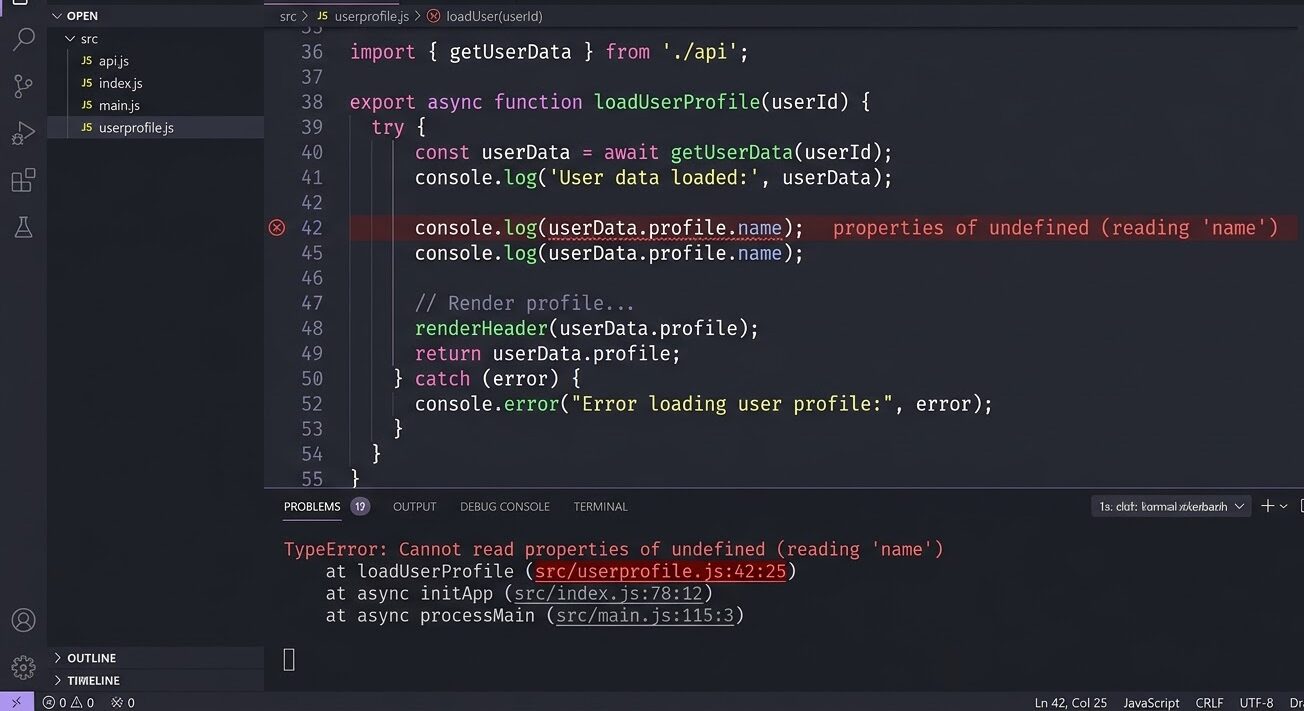
Cannot read properties of undefined 에러가 뜨면 메시지 읽는 법부터 시작하자.
TypeError: Cannot read properties of undefined (reading 'name')
    at getUserName (/app/utils.js:8:20)
    at renderProfile (/app/components/Profile.jsx:24:5)
(reading 'name') 부분이 핵심이다. undefined에서 name이라는 프로퍼티를 꺼내려고 했다는 뜻이다. 스택 트레이스 첫 줄에 파일명과 라인 번호가 있다. 거기서부터 추적하면 5분 안에 원인이 나온다.
이 undefined 에러가 뜨는 패턴은 크게 세 가지다. 케이스를 먼저 분류하고 해결하는 게 가장 빠르다.
Cannot read properties of undefined가 뜨는 이유
undefined인 값에서 .property 형태로 접근하면 JavaScript 엔진이 이 TypeError를 낸다. undefined는 값이 없다는 뜻이라 거기서 뭔가를 꺼내는 게 불가능하다.
let user; // 선언했지만 값이 없다 — undefined
console.log(user.name);
// TypeError: Cannot read properties of undefined (reading 'name')
에러 메시지에서 확인할 것은 두 가지다.
(reading 'xxx'): 어떤 프로퍼티 접근에서 실패했는지- 스택 트레이스 첫 줄: 실패한 코드의 위치 (파일명 + 라인 번호)
TypeError: Cannot read properties of undefined (reading 'email')
    at sendWelcomeEmail (/app/mailer.js:24:18)  ← 여기서 .email 접근 실패
    at createUser (/app/user.js:47:5)            ← createUser가 undefined를 반환했을 가능성
Cannot read properties of null도 같은 에러다. undefined 대신 null에 접근하는 경우이고, 해결법은 동일하다.
케이스 1: 변수가 초기화되지 않았다
가장 흔한 케이스다. 변수를 선언만 하고 값을 넣지 않거나, 함수가 undefined를 반환하는데 체이닝해서 접근하는 경우다.
// 잘못된 예 — 선언만 하고 값이 없다
let config;
console.log(config.apiKey); // TypeError

// 잘못된 예 — 함수에서 return을 빠뜨렸다
function getUser(id) {
  const user = db.find(id);
  // return 없음 — 자동으로 undefined 반환
}
const user = getUser(1);
console.log(user.name); // TypeError
해결법은 두 가지다. 기본값을 할당하거나, 접근 전에 값이 있는지 확인하자.
// 올바른 예 — 기본값 할당
let config = {};
console.log(config.apiKey); // undefined (에러 없음)

// 올바른 예 — return 추가
function getUser(id) {
  return db.find(id);
}

// 올바른 예 — 조건 체크
const user = getUser(1);
if (user) {
  console.log(user.name);
}

// 올바른 예 — 옵셔널 체이닝
console.log(user?.name); // user가 undefined면 undefined 반환, 에러 없음
함수 반환값이 항상 있다고 가정하는 습관이 이 케이스를 만든다. 함수를 쓸 때 “이 함수가 undefined를 반환할 수 있는가?”를 한 번 더 확인하자.
케이스 2: 배열/객체의 잘못된 경로로 접근했다
API 응답이나 복잡한 중첩 객체에서 경로를 잘못 파악한 경우다. 실제 구조와 접근 경로가 다를 때 발생한다.
// API 응답 구조
const response = {
  status: 200,
  data: {
    users: [
      { id: 1, profile: { name: '김영희' } }
    ]
  }
};

// 잘못된 예 — 경로를 잘못 파악했다
console.log(response.users[0].name);
// TypeError: response.users가 undefined
// response.data.users가 맞는 경로다

// 올바른 예
console.log(response.data.users[0].profile.name); // '김영희'
배열 인덱스를 잘못 쓰는 경우도 같다.
const items = ['사과', '바나나', '딸기'];
console.log(items[5].length); // TypeError: items[5]는 undefined

// 올바른 예
const item = items[5];
if (item !== undefined) {
  console.log(item.length);
}
이 케이스에서 가장 빠른 디버깅 방법은 console.log로 실제 구조를 먼저 찍어보는 것이다.
// 경로 파악 전에 전체 구조를 출력하자
console.log(JSON.stringify(response, null, 2));
응답 구조를 눈으로 확인하고 나서 접근 경로를 잡으면 헤맬 이유가 없다.
케이스 3: React 비동기 — API 응답 오기 전에 렌더링이 먼저 됐다
중급 개발자가 가장 자주 마주치는 케이스다. React에서 API 데이터를 fetch하는데, 응답이 도착하기 전에 컴포넌트가 먼저 렌더링되면서 undefined에 접근하는 경우다.
// 잘못된 예 — data가 도착하기 전에 렌더링됨
function UserProfile({ userId }) {
  const [user, setUser] = useState(); // 초기값 없음 — undefined

  useEffect(() => {
    fetch(`/api/users/${userId}`)
      .then(res => res.json())
      .then(data => setUser(data));
  }, [userId]);

  return <div>{user.name}</div>;
  // 첫 렌더링에서 user가 undefined → TypeError
}
에러가 뜨는 타이밍을 이해하면 해결법이 바로 보인다. 컴포넌트는 마운트되자마자 렌더링을 한 번 실행한다. useEffect 안의 fetch는 그 다음에 시작된다. 즉 데이터가 없는 상태에서 렌더링이 먼저 일어난다.
해결법은 두 가지다.
// 올바른 예 1 — loading 상태로 분기
function UserProfile({ userId }) {
  const [user, setUser] = useState(null);
  const [loading, setLoading] = useState(true);

  useEffect(() => {
    fetch(`/api/users/${userId}`)
      .then(res => res.json())
      .then(data => {
        setUser(data);
        setLoading(false);
      });
  }, [userId]);

  if (loading) return <div>로딩 중...</div>;
  return <div>{user.name}</div>; // 이 시점엔 user가 반드시 있다
}

// 올바른 예 2 — 초기값 + 옵셔널 체이닝
function UserProfile({ userId }) {
  const [user, setUser] = useState(null);

  useEffect(() => {
    fetch(`/api/users/${userId}`)
      .then(res => res.json())
      .then(setUser);
  }, [userId]);

  return <div>{user?.name ?? '이름 없음'}</div>;
  // user가 null이면 '이름 없음'을 렌더링
}
비동기 처리에서 발생하는 비슷한 패턴은 async/await에서 자주 하는 실수 5가지에서 더 자세히 다루고 있다.
옵셔널 체이닝 ?. 실전 패턴
옵셔널 체이닝(?.)은 undefined나 null에 접근할 때 에러 대신 undefined를 반환하는 문법이다(MDN 공식 문서). 중첩 객체 접근에서 특히 유용하다.
const user = undefined;

// 기존 방식 — 체크가 중첩돼서 길다
if (user && user.profile && user.profile.name) {
  console.log(user.profile.name);
}

// 옵셔널 체이닝
console.log(user?.profile?.name); // undefined (에러 없음)
?. 뒤에 ??(Nullish Coalescing)를 조합하면 기본값을 설정할 수 있다.
const name = user?.profile?.name ?? '익명 사용자';
// user나 profile이 없으면 '익명 사용자'를 사용한다
메서드 호출에도 쓸 수 있다.
const result = user?.getName?.(); // getName 메서드가 없으면 undefined단, 주의할 점이 있다. ?.는 에러를 숨기는 도구가 아니다. 남발하면 실제 버그가 조용히 무시된다.
// 이렇게 쓰면 어느 단계에서 undefined가 됐는지 추적하기 어렵다
const result = data?.items?.[0]?.price?.toFixed(2);

// 데이터 진입점에서 한 번만 체크하는 게 낫다
if (!data?.items?.length) {
  return '상품 없음';
}
const result = data.items[0].price.toFixed(2);?.는 “이 값이 없을 수 있다는 걸 알고 있고, 없을 때 undefined로 처리한다”는 의도가 명확할 때 쓰자.
undefined TypeError 자주 묻는 질문
Cannot read properties of null도 같은 방법으로 해결되나요?
그렇다. null과 undefined 모두 값이 없는 상태이고, .property 접근 시 같은 TypeError가 발생한다. 옵셔널 체이닝 ?.은 두 경우 모두 처리한다.
null?.name      // undefined (에러 없음)
undefined?.name // undefined (에러 없음)
TypeScript를 쓰면 이 에러를 사전에 막을 수 있나요?
막을 수 있다. strictNullChecks 옵션을 켜두면 undefined가 될 수 있는 값에 체크 없이 접근할 때 컴파일 에러를 낸다. 런타임 에러 전에 잡힌다.
let user: User | undefined;
console.log(user.name);
// 컴파일 에러: Object is possibly 'undefined'

// 올바른 예 — 타입 가드
if (user) {
  console.log(user.name); // 이 블록 안에서는 user가 User 타입으로 좁혀진다
}
옵셔널 체이닝을 쓰면 에러가 완전히 사라지는 건가요?
에러는 사라지지만, 버그가 사라지는 건 아니다. ?.는 undefined를 조용히 반환할 뿐이다. 그 undefined를 받아서 연산하거나 렌더링하면 의도하지 않은 동작이 생긴다. ?.와 함께 ??로 기본값을 항상 지정하자.
한줄 정리:
Cannot read properties of undefined가 뜨면(reading 'xxx')부분과 스택 트레이스 첫 줄을 확인하자. 케이스는 세 가지다 — 미초기화 변수, 잘못된 객체 경로, React 비동기 타이밍. React에서 발생한다면 loading 상태 분기나?.+ 초기값이 먼저다.